PetWare – Theme for Pet Stores & Veterinary Supplies
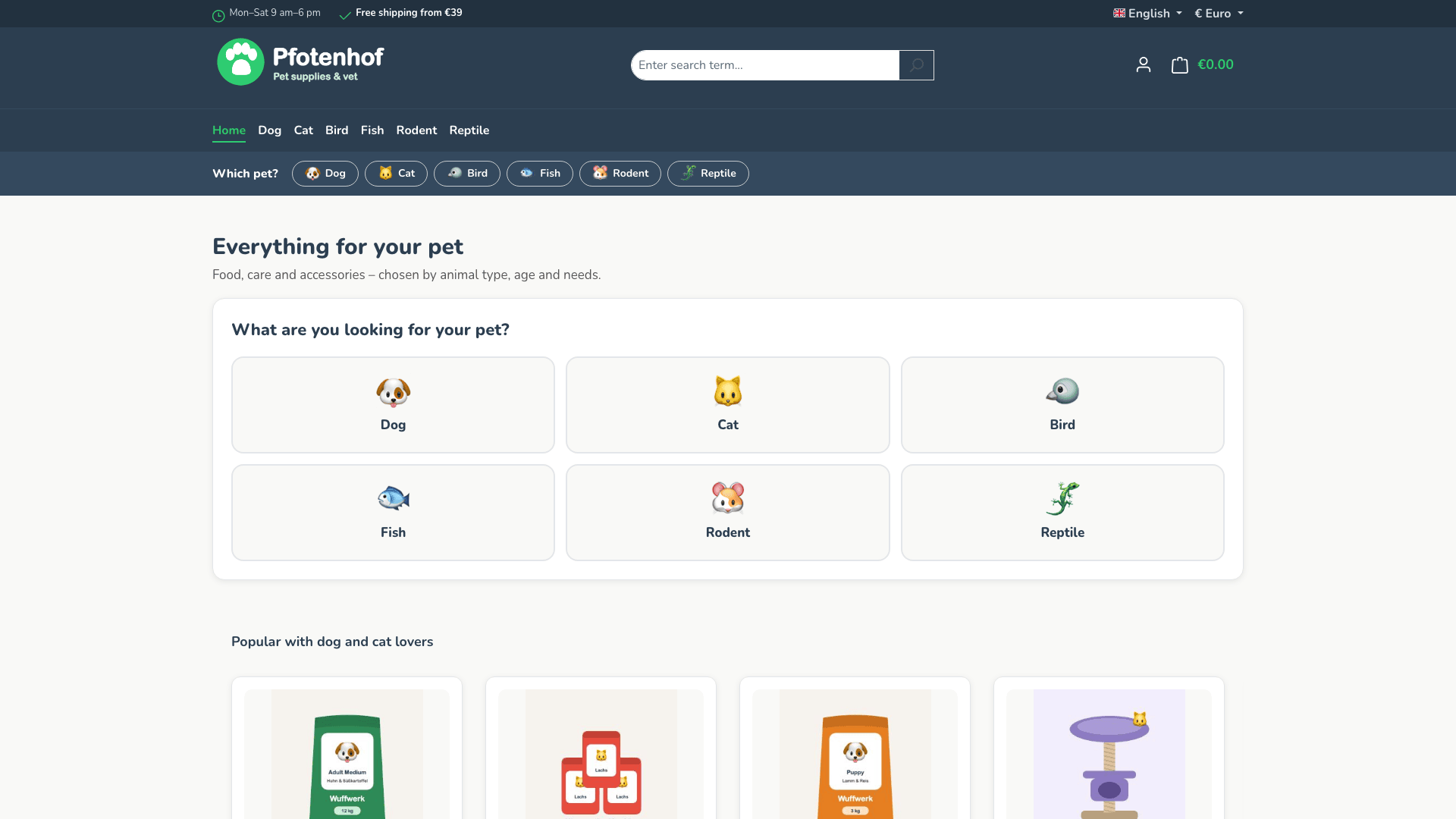
PetWare is a Shopware 6 theme for pet stores, veterinary practices and pet supply shops. The warm, friendly design with rounded shapes and animal pictograms invites customers to browse, and the animal type selector leads them straight to the right products for dog, cat, bird, fish, small animal or reptile.
New in all CNK themes
Already included in PetWare (base 0.27): FAQ in five layouts, reviews with star distribution, "Modern" mega menu with columns and side menu (drill-down), product card with delivery status, product number, "Pre-order" badge and slider counter, elements "Season & trends" and "Dates". Short details below the name: the content of the pack by default (e.g. "12 kg") or else the weight. Overview of what is new.
Highlights
- 🐾 Animal type selector for dog, cat, bird, fish, small animal and reptile below the main navigation
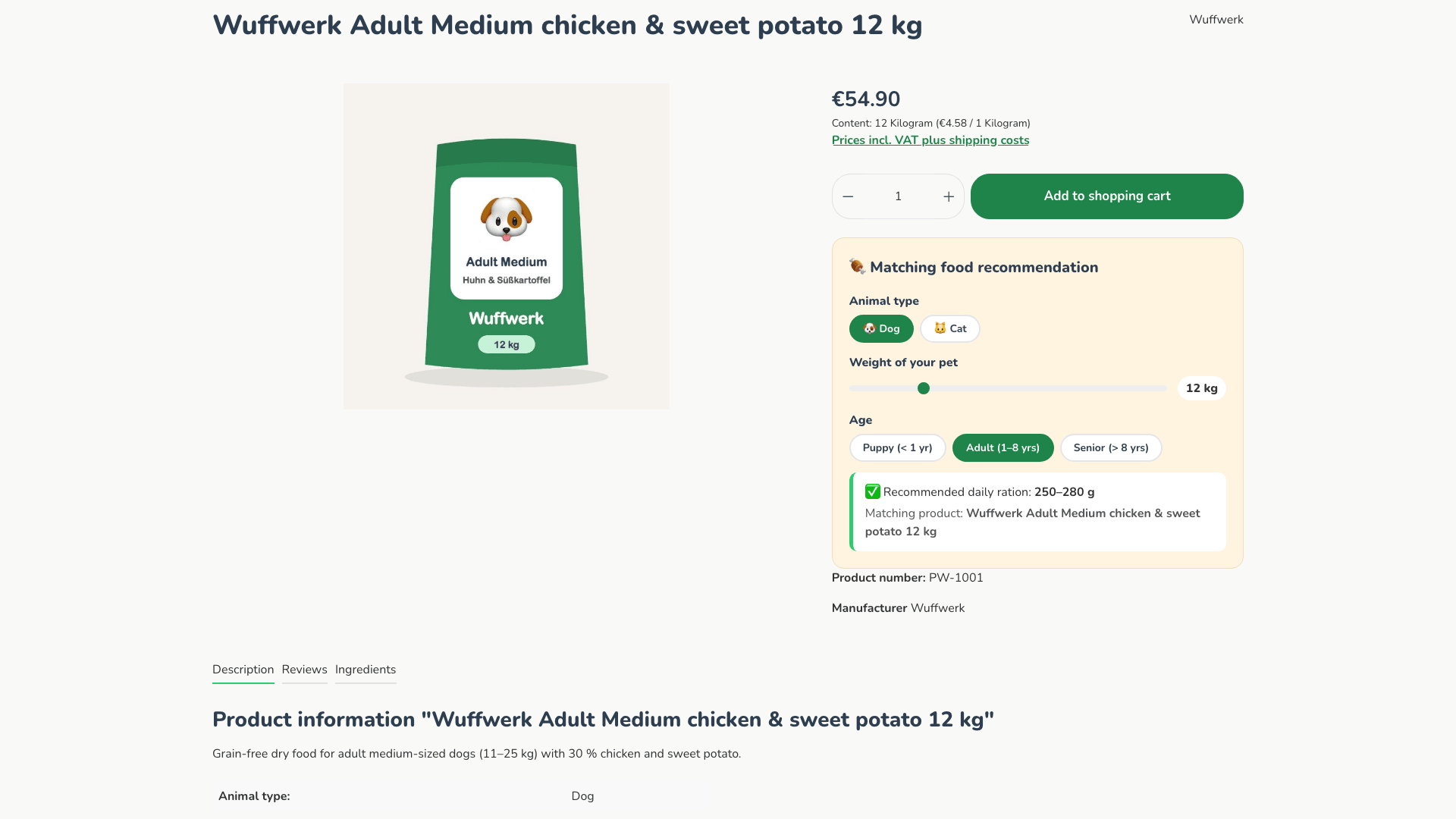
- 🍖 Food configurator with daily ration by animal type, weight and age
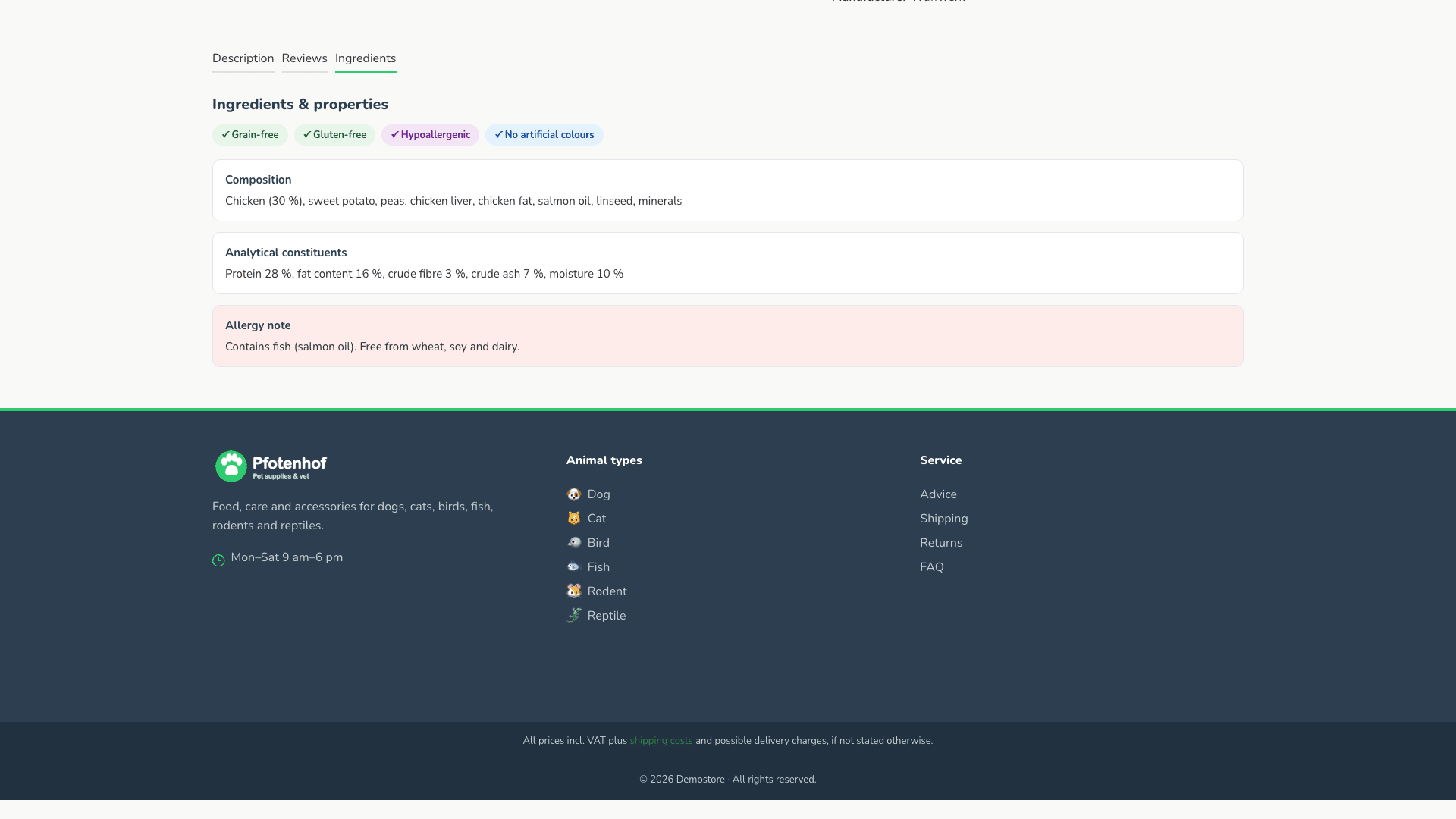
- 🌾 Ingredients & allergens in a dedicated tab on the product page
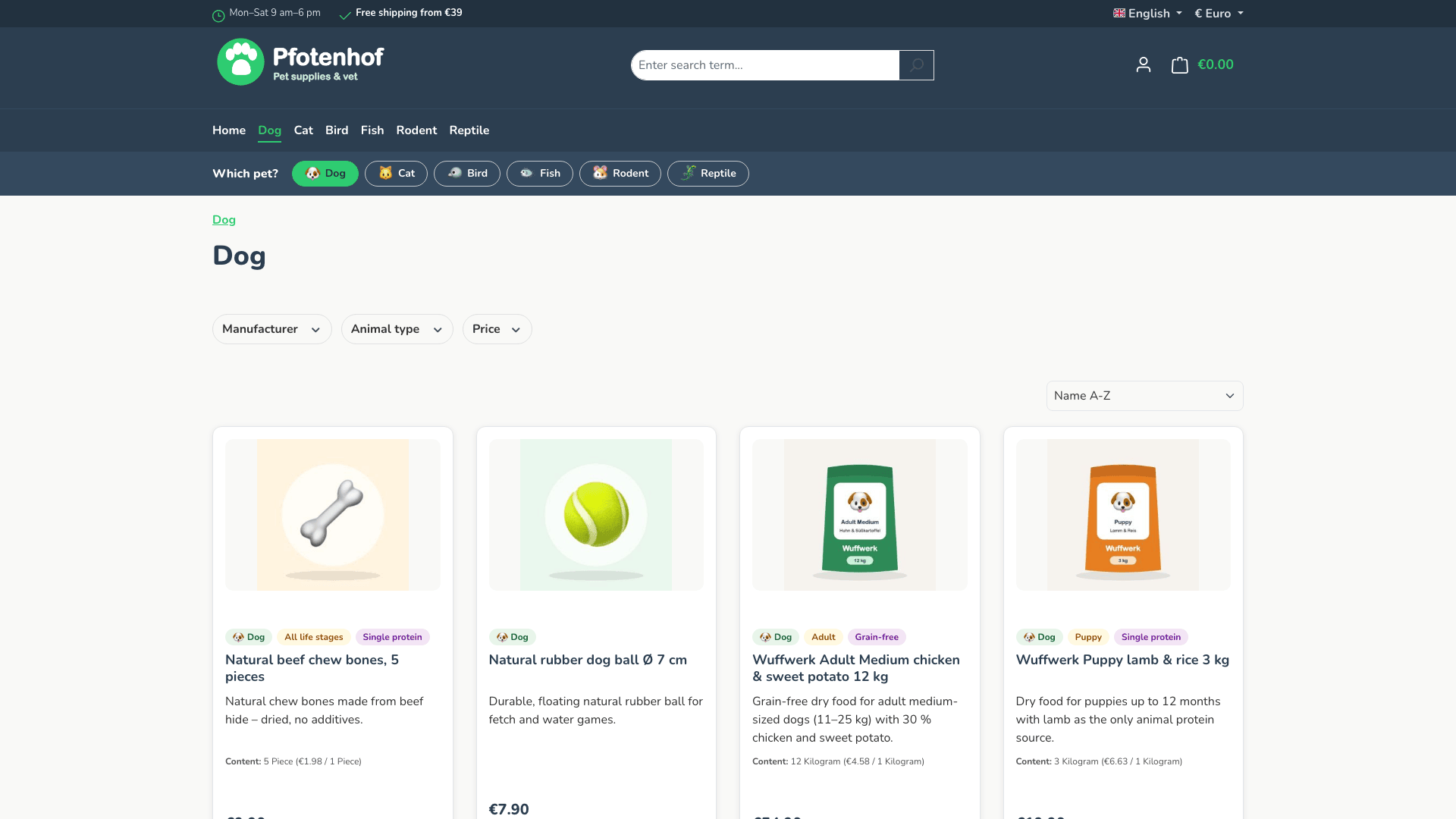
- 🏷️ Badges for animal type, life stage, size and diet in the product boxes
- 🏥 Appointment request for veterinary practices on the home page
- 🎨 4 styles in the theme hub (pet store, raw-food manufactory, vet practice, discount) applied with one click
🔧 Installation
- Requirement: Shopware 6.7
- Install via the Shopware Store or as a ZIP file under Extensions > My extensions
- Install and activate the theme
🎨 Assigning the theme
- Open Content > Themes and select PetWare.
- Under Sales channels, assign the desired storefront sales channel.
- Save – Shopware compiles the theme automatically.
Nunito font without external requests
PetWare uses the rounded, friendly Nunito font (SIL Open Font License). It ships with the theme and is loaded from your shop – there are no requests to Google Fonts or any other external service.
🧭 Theme hub & styles
Under Content > PetWare you find the theme hub with all settings in one place.
Styles
A style sets colours, font, header, navigation, product cards, product page and footer in one click – you can keep adjusting afterwards in the theme manager. All four styles are included in the theme price.
| Style | Look |
|---|---|
| Modern pet store | Teal on white with a terracotta accent, header with category bar, a generous card grid, a benefits bar throughout |
| Premium raw-food manufactory | Forest green and mustard gold on cream, serif typeface, centred logo, framed product cards, a calm, centred footer |
| Vet practice shop | Clinical blue on white, tidy minimal cards with the article number, contact buttons, no effects |
| Discount bulk packs | Red and amber on white, mega menu, a dense card grid showing the weight, sticky cart |
Without an applied style, the theme keeps its previous look as the default setting.
⚙️ Configuration
All settings are available in the theme manager under Content > Themes > PetWare.
Colours, font and logo
| Setting | Default |
|---|---|
| Primary colour | #2ecc71 (Fresh Green) |
| Secondary colour | #2c3e50 (Dark Navy) |
| Border colour | #e0e0e0 |
| Text colour / headings | #333333 / #2c3e50 |
| Buy button | #1e8449, white text (accessible contrast) |
| Font | Nunito |
| Logo (desktop, tablet, mobile) | Your logo – optionally displayed in white on the dark header |
Block "PetWare – contact & footer"
| Setting | Where it appears |
|---|---|
| Phone, email | Top bar and footer (optional) |
| Opening hours | Top bar and footer |
| Notice text | Top bar, e.g. "Free shipping from €39" |
| Slogan | Footer, below the logo |
Empty fields are not displayed in the shop.
Block "PetWare – storefront components"
| Switch | Default |
|---|---|
| Show header logo in white | on |
| Animal type selector below the main navigation | on |
| Animal type tiles on the home page | on |
| Vet appointment request on the home page | off |
| Animal, size, age and diet badges in product boxes | on |
| Food configurator on the product page | on |
| "Ingredients" tab on the product page | on |
Styling of header, navigation, product cards and footer (set individually, or together via a style in the theme hub)
| Setting | Options | Default |
|---|---|---|
| Header style | Classic, Centered, Compact, With category bar, Split, Bold search with coloured navigation, Single row with navigation | Classic |
| Menu type | Dropdown, Side menu (drill-down) | Dropdown |
| Card style (product boxes) | Standard, Minimal, With border and info bar, Info on the image, Horizontal, Tile, Dark | Standard |
| Footer style | Columns, Centred/minimal, Compact | Columns |
🧩 Storefront components
Animal type selector
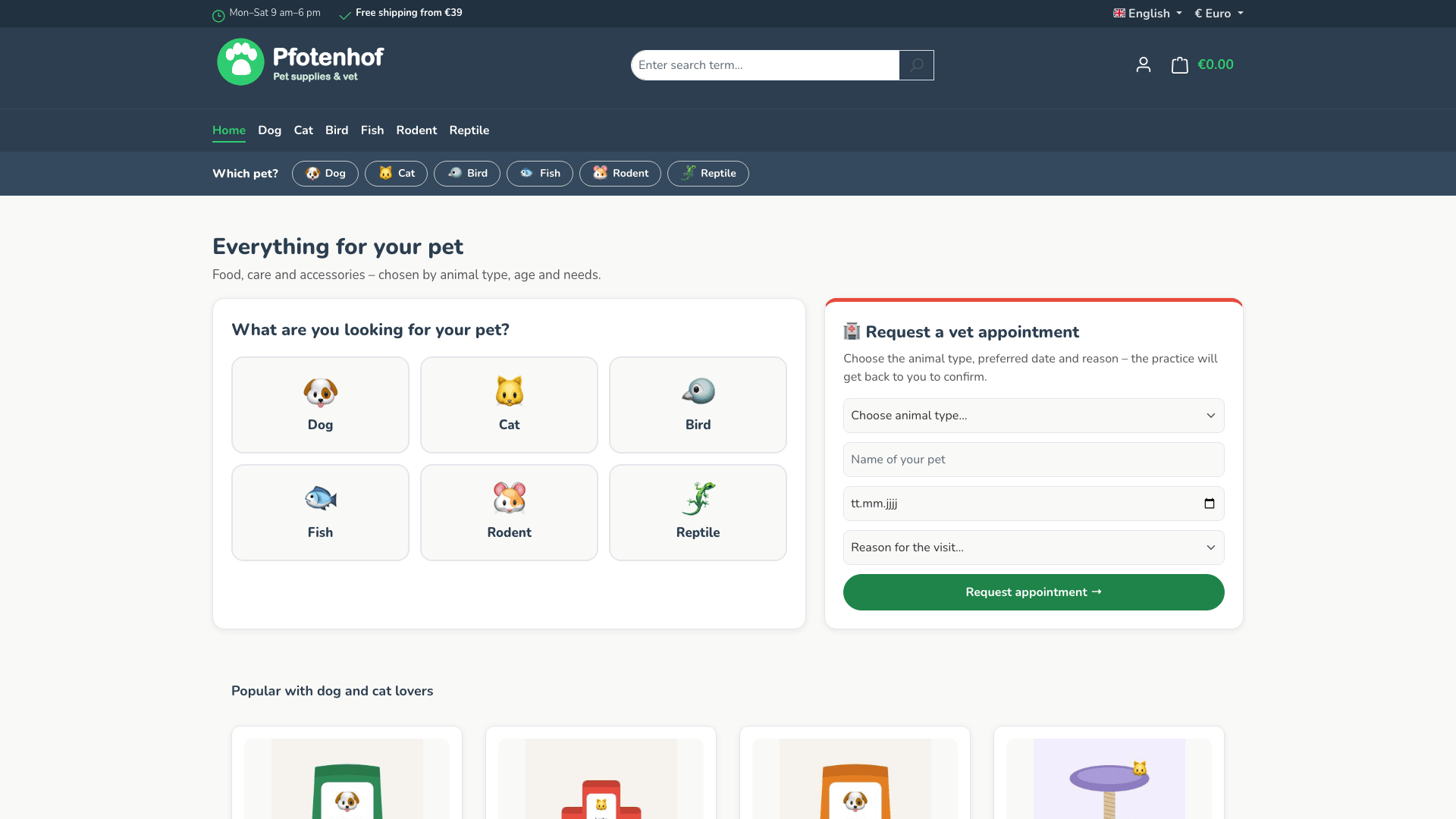
Below the main navigation, customers choose their animal type: dog, cat, bird, fish, small animal or reptile. The active animal type is highlighted in green. On the home page, the animal types also appear as large tiles above the content of your shopping experience.
Product boxes with badges
Above the product name, coloured badges show the animal type, size/breed (small breed, medium breed, large breed, giant breed), life stage (e.g. puppy, adult, senior) and diet (e.g. grain-free). For food with a base price, Shopware additionally shows the price per kilogram. You maintain the size on the product under Specifications, alongside animal type, life stage and diet.
Food configurator
On the product page of food items, the configurator shows the animal type, weight and age of the animal and the recommended daily ration – ideal for dog food, cat food and special diets.
"Ingredients" tab
The "Ingredients" tab shows properties such as grain-free, gluten-free, hypoallergenic or no artificial colourings as badges, along with the composition, analytical constituents and an allergy notice.
Appointment request for veterinary practices
For veterinary practices with an online shop, the switch "Vet appointment request on the home page" displays a form next to the animal type tiles: animal type, pet's name, preferred date and reason for the visit.
Header and footer
Header with logo, top bar with opening hours and notice text, and a footer with logo and contact, animal types and service (footer navigation of your sales channel). Header style, menu type and footer style can each be chosen individually (see table above) or set together via a style in the theme hub.
More shopping experience elements
The shopping experiences editor also offers placeable elements for designing your home page and category pages:
- Brand/logo slider – logos of your food and accessory brands as a band or slider
- Customer reviews – reviews with star distribution, as a summary or a list
- Shop-by-pet navigation – the animal type selector as a category bar in the header (see header style "With category bar")
- Subscription benefits – a benefits/USP element, e.g. for savings-subscription notices
- Advice/magazine teaser – process-steps or image-and-text elements for feeding tips and breed portraits
- Vet appointment tile – a visible pointer to the appointment request, independent of the home page tile
Each element is freely placeable, with its own texts and visibility settings, and included in the theme price.
✏️ Customising texts
All theme texts are snippets in German and English. You can find them under Settings > Snippets with the prefix cnkPetWare.
🔒 Data protection (GDPR)
PetWare loads no external resources: no Google Fonts, no CDNs, no tracking scripts. All files are served by your own Shopware installation.
💳 Plans (in-app purchase)
| Feature | Theme | Business | Pro |
|---|---|---|---|
| Animal type selector, food configurator, diet/allergen filter, animal/size/age/diet badges | ✅ | ✅ | ✅ |
| "Ingredients" tab, appointment request form (display only) | ✅ | ✅ | ✅ |
| Theme hub, 4 styles, brand/logo slider, customer reviews, more shopping experience elements | ✅ | ✅ | ✅ |
| Appointment request with real sending (email to the practice, confirmation to the customer) | – | ✅ | ✅ |
| Multi-channel configuration (different animal tiles per sales channel) | – | ✅ | ✅ |
| Admin dashboard widget (appointment request overview, most filtered animal types) | – | ✅ | ✅ |
| 4 ready-made demo packages (dog, cat, exotics/mixed, vet practice) | – | – | ✅ |
| Extended appointment management (multiple locations/opening hours, calendar view) | – | – | ✅ |
| White-label (without CNK reference) | – | – | ✅ |
Nothing is hidden
Locked features stay visible in the admin – with a note on which plan unlocks them.
❓ FAQ
Which shops is the theme suitable for?
For pet stores and pet specialty retailers, online shops for pet supplies, veterinary practices with a shop, pet food specialists, and aquarium and terrarium retailers.
Can I hide individual components?
Yes. The animal type selector, animal type tiles, appointment request, product badges, food configurator, the "Ingredients" tab and the white header logo can each be switched on and off individually.
What's included in the theme price, and what belongs to Business or Pro?
The theme price already covers the full animal, size and diet filtering, the food configurator, all four styles and the shopping experience elements. Business unlocks the appointment request with real sending, multi-channel configuration and the admin dashboard widget; Pro adds the four demo packages, extended appointment management and white-label. See the "Plans" table above.
Are external fonts loaded?
No. The Nunito font ships with the theme and is loaded from your shop.
Which Shopware version is required?
Shopware 6.7. No additional plugins are required.
Further documentation content and screenshots (styles, shopping experience elements) will follow with the next versions of the theme.
📬 Support
For questions, suggestions for improvement or custom adaptations, please contact us by email at support@cnk-plugins.de.