Global Rental – Rental for Every Sector
Global Rental turns a Shopware 6 shop into a complete rental shop – for every sector in which items are rented out for a period of time: event and party rental (bouncy castles, party furniture, tents, tableware, sound and light), tool and machine hire, trailers, photo and video equipment, leisure items and more.
The extension works with the Shopware default theme and with any theme. It can be added to an existing shop next to normal sales: a product is rented only, sold only, or both.
Status
Global Rental is being prepared for the Shopware Community Store. This page describes the feature set of the first version.
Highlights
- 📅 Rental period (start and end) for the whole cart, with calendar and blocked days
- 💶 Price by duration: per day, weekend flat rate, tiered prices by number of days
- 📦 Availability per unit with protection against double bookings at checkout
- 🧩 Variants are supported – including price and deposit
- 🔐 Deposit per product and per variant as a separate cart line
- 🧹 Buffer days before and after each rental for delivery, cleaning and inspection
- 🗂️ Rental status in the admin: reserved › handed out › returned › cancelled
- 🎨 Works with any theme, without changing other extensions
🎯 What Global Rental is for
Out of the box, Shopware knows one stock value per product – without a time period. Rental businesses need answers to different questions: Is the bouncy castle still free on 14 June? What does it cost for a weekend? Which deposit applies? When does it come back and when can it go out again?
Global Rental answers these questions right in the shop – in the storefront for the customer and in the admin for the merchant.
| Sector | Typical items | What Global Rental covers |
|---|---|---|
| Event / party rental | bouncy castles, beer tent sets, tents, tableware, sound & light, photo booth | one period for the whole cart, weekend flat rate, deposit, buffer days for cleaning |
| Tool and machine hire | hammer drills, dehumidifiers, plate compactors, mini excavators | daily price with tiers, several identical units, deposit per device |
| Trailers and transport | car trailers, bike racks, roof boxes | variants (sizes), deposit per variant, pick-up and return days |
| Photo and video equipment | cameras, lenses, light kits | high deposit per variant, minimum rental period |
| Leisure | canoes, SUP boards, camping gear | weekend flat rate, seasonal business |
🛒 How customers rent
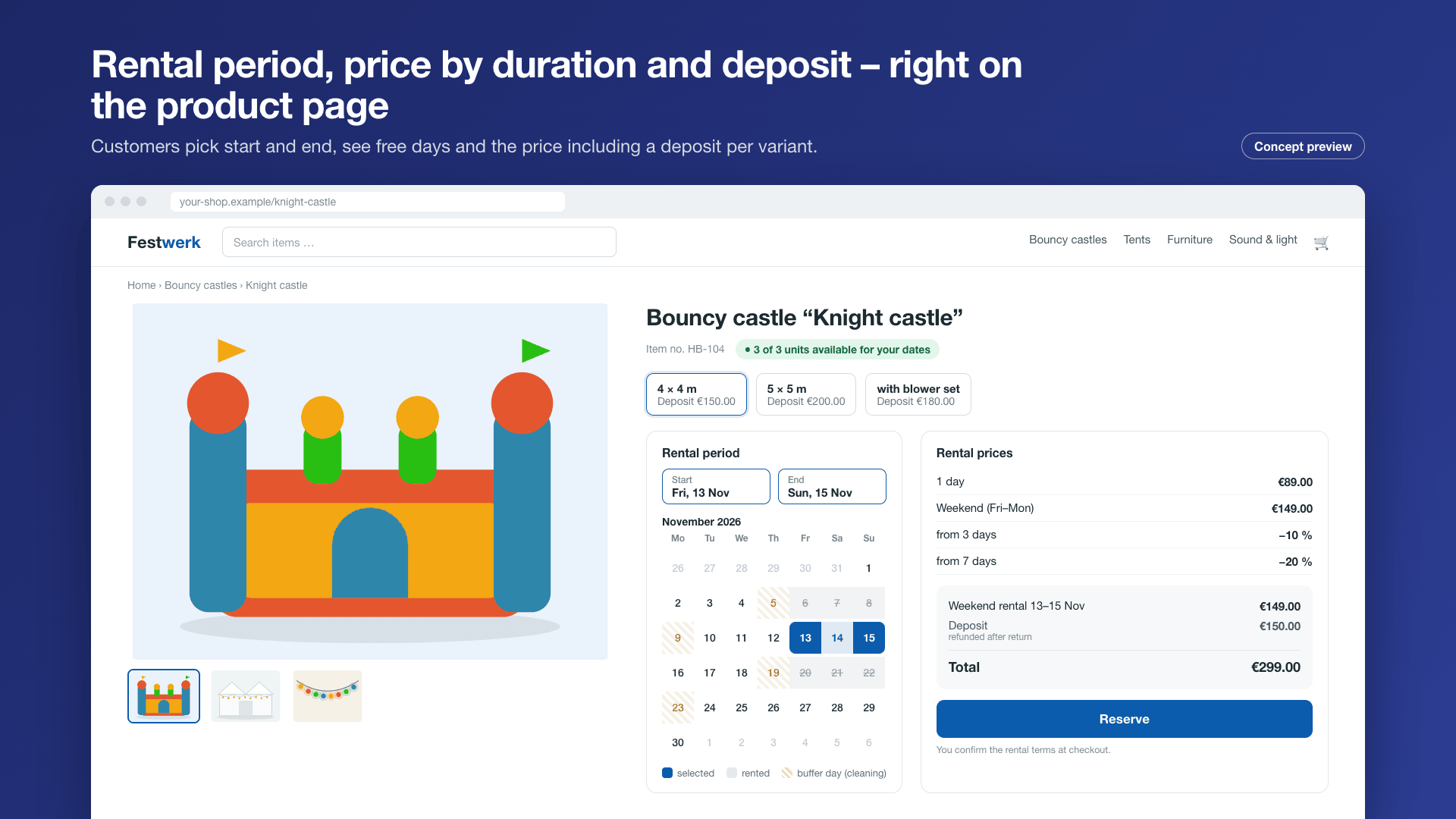
- On the product page or in the cart, the customer picks the start and end of the rental. Blocked and fully booked days cannot be selected.
- The rental price is calculated and shown right away for the chosen period (e.g. "3 days" or "weekend").
- If the product has a deposit, it appears as a separate line in the cart, in the order confirmation and in the documents.
- Before buying, the customer accepts the rental terms with a separate checkbox.
- When the order is placed, Global Rental checks availability again – the same unit is never rented twice, even when two customers order at the same moment.
One period for the whole cart
In event rental, customers usually rent everything for the same date. That is why the rental period applies to the whole cart. Rental items and normal items (e.g. consumables) can be ordered together.
⚙️ Setting up rental items
You find the settings in the product detail on the Rental card.
| Setting | Description |
|---|---|
| Rental type | Rental only, rental and sale or sale only (default, the product is unchanged) |
| Price per day | Base price per rental day |
| Weekend flat rate | Fixed price for Friday to Monday (optional) |
| Tiered prices | Lower daily price from a certain duration, e.g. from 3 days, from 7 days |
| Minimum / maximum duration | Shortest and longest selectable rental period in days |
| Number of units | How many identical units can be rented out |
| Deposit | Amount per product; can differ per variant |
| Buffer days | Blocked days before and after each rental (delivery, cleaning, inspection) |
| Blocked days | Single days on which the product is not rented out |
Variants
Price, deposit and number of units can differ per variant – for example a small and a large bouncy castle with different deposits.
🗂️ Managing rentals
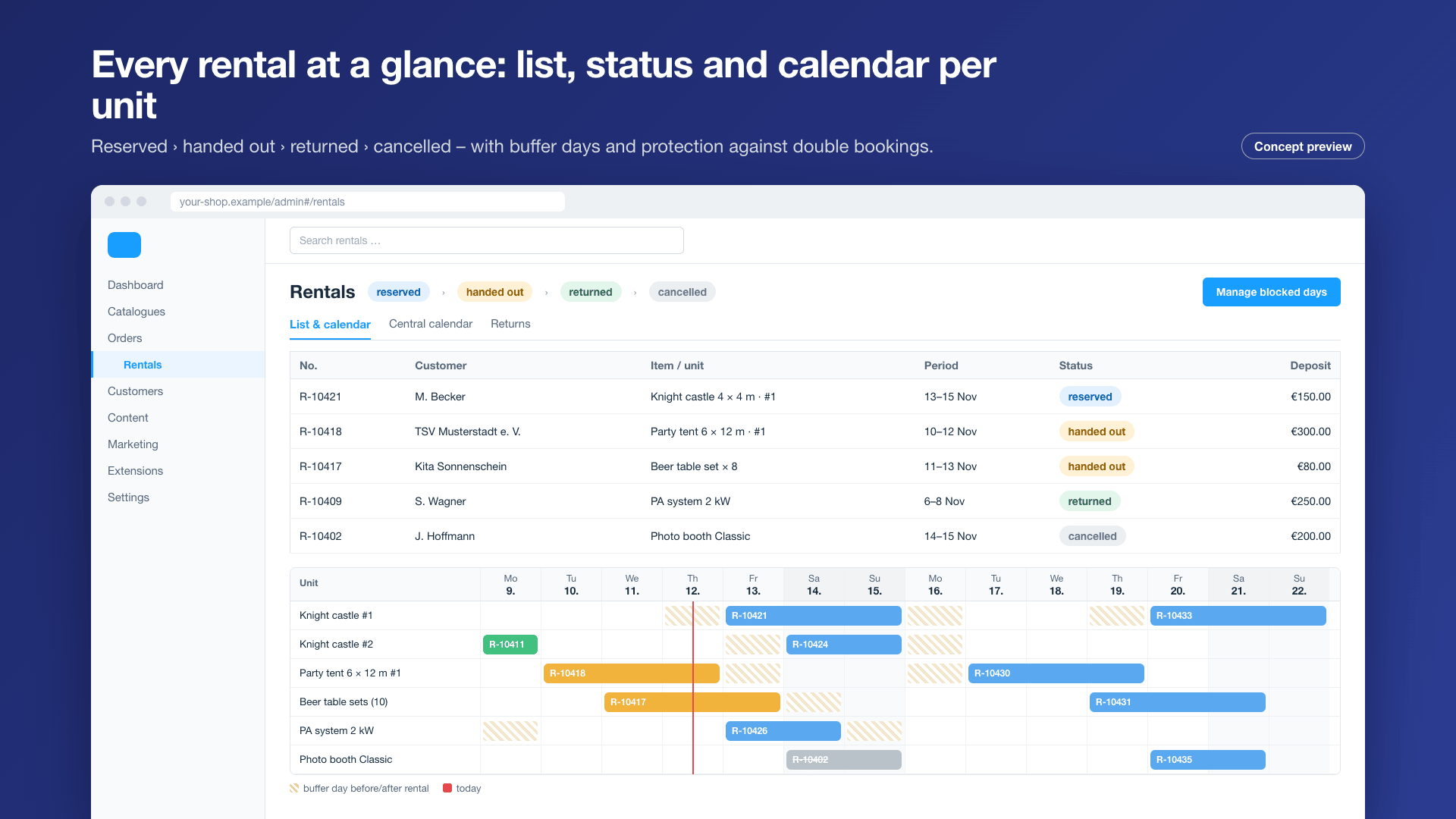
Under Orders › Rentals you see all rentals in a list and in a calendar view.
| Status | Meaning |
|---|---|
| Reserved | Order received, unit blocked for the period |
| Handed out | Item was picked up or delivered |
| Returned | Item is back; available again after the buffer days |
| Cancelled | The period is released again |
- Filter by period, status and product, sortable by rental start
- Calendar view: which units are out when
- The order stays a normal Shopware order – payment, shipping, invoice and documents work as usual
Emails
For every status change, Global Rental provides events in the Flow Builder, e.g. a reminder before the rental starts or before the return. You decide on texts and timing.
💳 Plans (in-app purchase)
The core features are included in the price of the extension. Additional features can be booked as an in-app purchase (monthly subscription) right in Shopware. Shopware shows the current prices in the Store and in the in-app purchase dialog.
| Feature | Base | Business | Pro |
|---|---|---|---|
| Rental items (rental only or rental + sale) | ✅ | ✅ | ✅ |
| Rental period with calendar and blocked days | ✅ | ✅ | ✅ |
| Price per day, weekend flat rate, tiers, minimum/maximum duration | ✅ | ✅ | ✅ |
| Availability per unit, protection against double bookings | ✅ | ✅ | ✅ |
| Deposit per product and variant, variants | ✅ | ✅ | ✅ |
| Buffer days, rental status, list and calendar in the admin | ✅ | ✅ | ✅ |
| Rental terms checkbox, Flow Builder events | ✅ | ✅ | ✅ |
| Central calendar: blocked days for all products, company holidays, public holidays DE/AT/CH | – | ✅ | ✅ |
| Pick-up and return times, time slots | – | ✅ | ✅ |
| Delivery and setup with zones and prices | – | ✅ | ✅ |
| Request mode (rental on confirmation) | – | ✅ | ✅ |
| Extension by the customer | – | ✅ | ✅ |
| Return report: damage, photos, deposit retention | – | ✅ | ✅ |
| Shopping experiences element "Search by date" | – | ✅ | ✅ |
| Inventory per unit: serial number, condition, maintenance | – | – | ✅ |
| Rental packages (e.g. "Kids' birthday"), seasonal prices | – | – | ✅ |
| Late fees | – | – | ✅ |
| Listing filter "available in period" | – | – | ✅ |
| Exports: hand-out and return slip, delivery plan (CSV/XLSX/PDF), iCal feed | – | – | ✅ |
Nothing is hidden
Features of a higher plan stay visible in the interface – with a note on which plan unlocks them.
🔧 Installation
- Install from the Shopware Store or as a ZIP
- Activate under Settings › Extensions
- Menu entry under Orders › Rentals
- Roles "viewer" and "editor" under Settings › Users & permissions
- Requirement: Shopware 6.7
⚖️ Legal notes
Whether a right of withdrawal applies to a rental, how a deposit is treated for tax purposes and which rental terms apply depends on the individual case. Global Rental gives no legal advice: texts for rental terms and notes are fully editable, and the shop can be run with or without a right of withdrawal for rental items. Please have your texts checked by a lawyer.
🔒 Data protection (GDPR)
All rental data stays in your Shopware database. Global Rental does not send data to external services.
❓ FAQ
Does Global Rental work with my theme?
Yes. The extension uses the standard areas of the product page, cart and checkout and works with the Shopware default theme and with other themes. The RentWare theme is tailored to rental shops but is not required.
Can I rent and sell in the same shop?
Yes. Each product is either a normal item for sale, a rental item, or both. Items for sale can be ordered together with rental items.
Can I set a deposit per variant?
Yes. The deposit can be set per product and differently per variant, and appears as a separate line in the cart.
What if I have several identical items?
You enter the number of units. A period is fully booked as soon as all units – including buffer days – are taken.
Is the deposit refunded automatically?
The deposit is paid with the order. You trigger the refund after the return through your payment method; with the Business plan you document damage and any retention in the return report.
What happens when I uninstall?
When uninstalling, you can choose whether to keep the rental data. Orders always remain as normal Shopware orders.
📬 Support
For questions, suggestions or custom adjustments, contact us by email at support@cnk-plugins.de.