Consultation Appointment Booking System
This plugin adds a dedicated 1:1 consultation appointment booking system directly to your Shopware 6 storefront – with no external SaaS dependency such as Calendly and no data transfer to third parties. Ideal for merchants selling products that require explanation, such as furniture and kitchen retailers, jewelers, opticians, travel agencies or B2B shops.
The free core already covers complete appointment booking. Optional plans (In-App Purchase) unlock multiple consultants, calendar invites, reminders and more.
Highlights
- 🗓️ 1:1 appointment booking right in the Shopware storefront (
/beratung) - 👥 Any number of consultants with their own availability (plan dependent)
- 🔓 Booking possible without a customer account
- 📎 .ics calendar invite for customer and consultant
- 🧱 Shopping Experiences (CMS) compatible block for free placement
- 🔒 GDPR compliant – all data stays in your Shopware database
💳 Free core & optional plans
The plugin is free and already provides complete appointment booking without any plan. Additional features are booked optionally as an In-App Purchase (monthly subscription) directly in Shopware – cancel anytime. Requirement: Shopware 6.7 and active In-App Purchases.
| Feature | Free | Starter | Business | Pro |
|---|---|---|---|---|
| 4-step booking form in the storefront | ✅ | ✅ | ✅ | ✅ |
| Booking without a customer account | ✅ | ✅ | ✅ | ✅ |
| Weekly availabilities per consultant | ✅ | ✅ | ✅ | ✅ |
| Booking overview with status in the admin | ✅ | ✅ | ✅ | ✅ |
| Confirmation email (text) | ✅ | ✅ | ✅ | ✅ |
| Number of consultants | 1 | 3 | unlimited | unlimited |
| Bookings per month | 5 | unlimited | unlimited | unlimited |
| .ics calendar invite | – | ✅ | ✅ | ✅ |
| Reminder emails | – | ✅ | ✅ | ✅ |
| Blocked days & vacations per consultant | – | ✅ | ✅ | ✅ |
| CMS block (Shopping Experiences) | – | ✅ | ✅ | ✅ |
| Manual appointment entry in the admin | – | – | ✅ | ✅ |
| Cancellation emails | – | – | ✅ | ✅ |
| CSV export of all bookings | – | – | – | ✅ |
Nothing is hidden
Locked features stay visible in the interface – with a hint about which plan unlocks them and a button to book it directly (In-App Purchase). Current prices are shown by Shopware directly in the In-App Purchase dialog.
🔧 Installation
- Requirement: CNK Foundation plugin
- Install via the Shopware Store or ZIP
- Activate in the Plugin Manager
- Menu entry available under Customers > Consultation
⚙️ Configuration
You can find the plugin configuration under Settings > Extensions > Consultation Appointment Booking System.
| Setting | Description | Default |
|---|---|---|
daysAhead | How many days into the future customers can book | 28 |
autoConfirm | Set new bookings to “confirmed” immediately (otherwise “open”) | on |
timezone | Time zone for appointments and the calendar invite (.ics) – picked from a dropdown of all time zones | Europe/Berlin |
reminderEnabled | Send a reminder email before the appointment | on |
reminderHoursBefore | Hours before the appointment the reminder is sent | 24 |
🎨 Colours
In the Colours section of the plugin configuration you adapt the look to your shop design — no coding required:
| Setting | Description | Default |
|---|---|---|
| Primary colour | Main colour for buttons, avatar rings and highlights. Lighter/darker shades (hover, disabled, notices) are derived automatically. | #6d28c9 |
| Button text colour | Text colour on the primary buttons and inside the initials avatars | #ffffff |
One colour, consistent design
Setting just the primary colour is enough — every other shade is computed automatically, so the whole booking UI appears consistently in your chosen colour.
Reminders & calendar invite
Reminder emails and the .ics attachment are available from the Starter plan onwards. Without a matching plan the setting stays visible but is not executed.
👥 Managing consultants
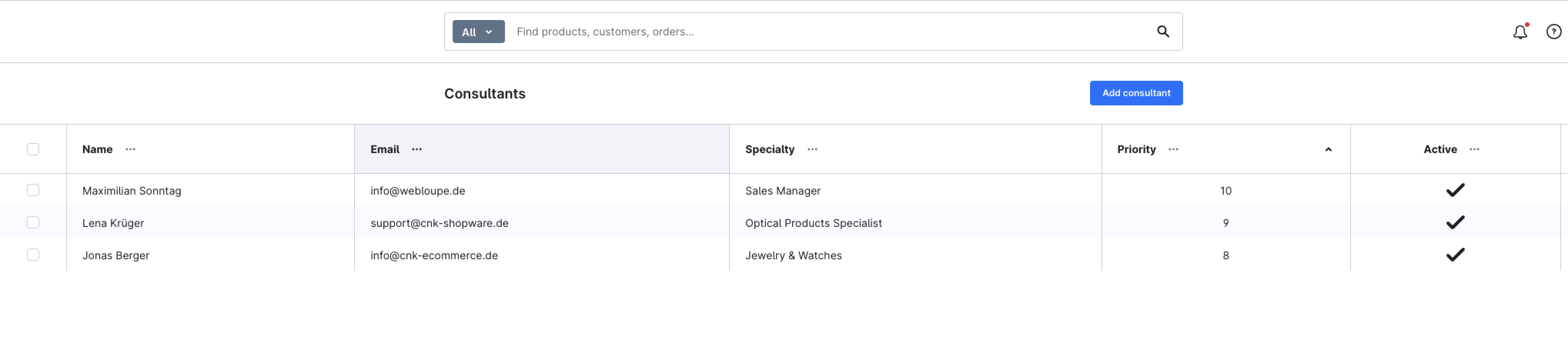
Under Customers > Consultation > Consultants you create your consultants. Per consultant you can set:
- Name and email address (for appointment notifications)
- Photo (media)
- Description and specialty (shown on the consultant card) – translatable per language
- Priority — higher values are shown first in the list (default: 0)
- Active status (controls visibility in the storefront)
- Availabilities per weekday including slot duration
- Blocked days & vacations (from Starter)
Multi-language shops
Description and specialty are translatable. Use the language switcher at the top right of the consultant detail view to maintain the texts per language; the storefront automatically shows the text for the current sales-channel language, falling back to the default language for untranslated languages.
Consultant limit per plan
Free: 1 consultant · Starter: 3 consultants · Business/Pro: unlimited. Once the limit is reached, the interface points to the required upgrade.
📅 Availabilities & slots
For each consultant you define weekly time windows with a fixed slot duration. The plugin automatically calculates the bookable time slots for the upcoming days (daysAhead) and hides slots that are already booked or blocked.
- Blocked days (from Starter) block individual days or ranges per consultant – for example vacations or public holidays.
- The storefront calendar shows only available slots.
🛒 Booking flow in the storefront
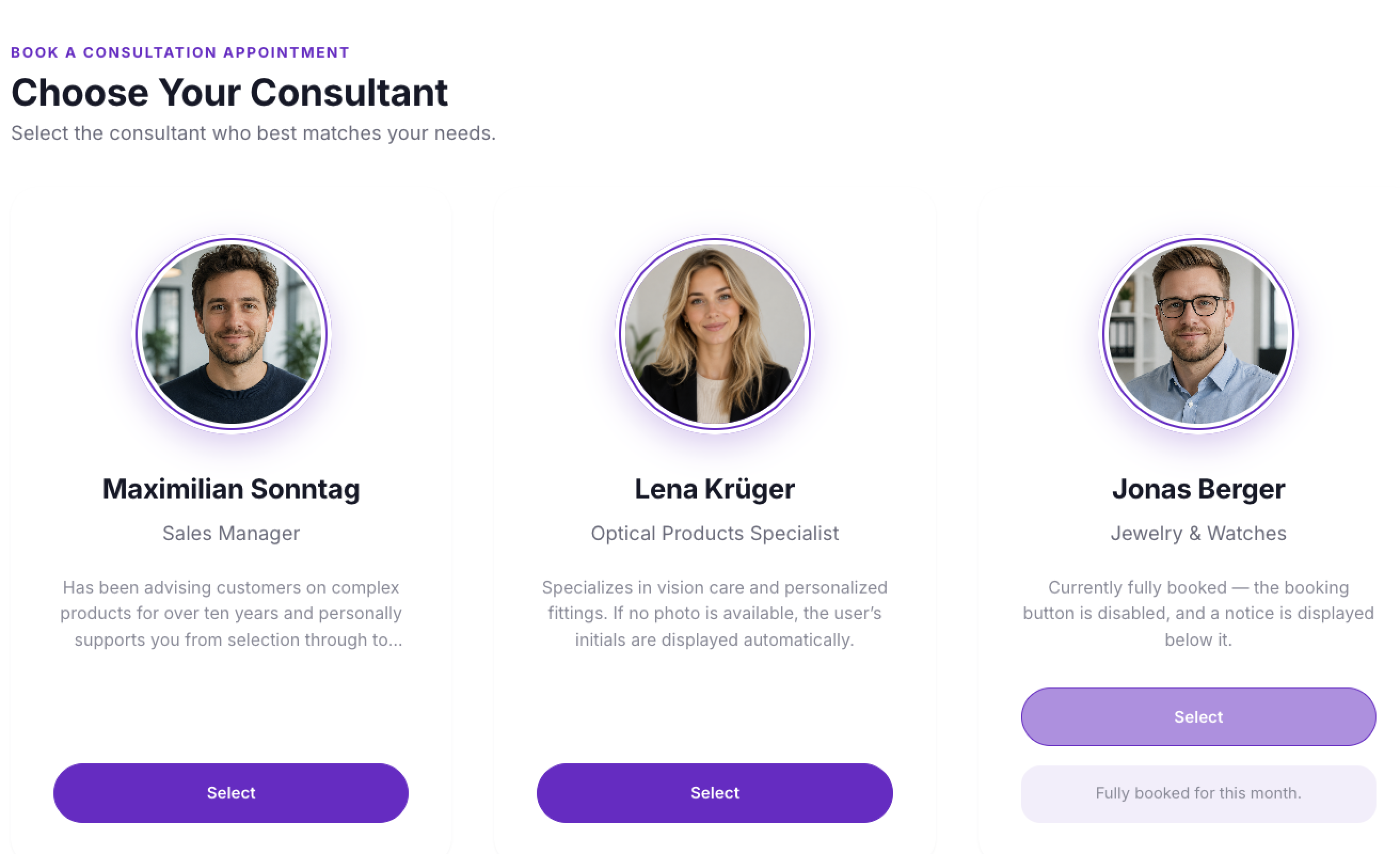
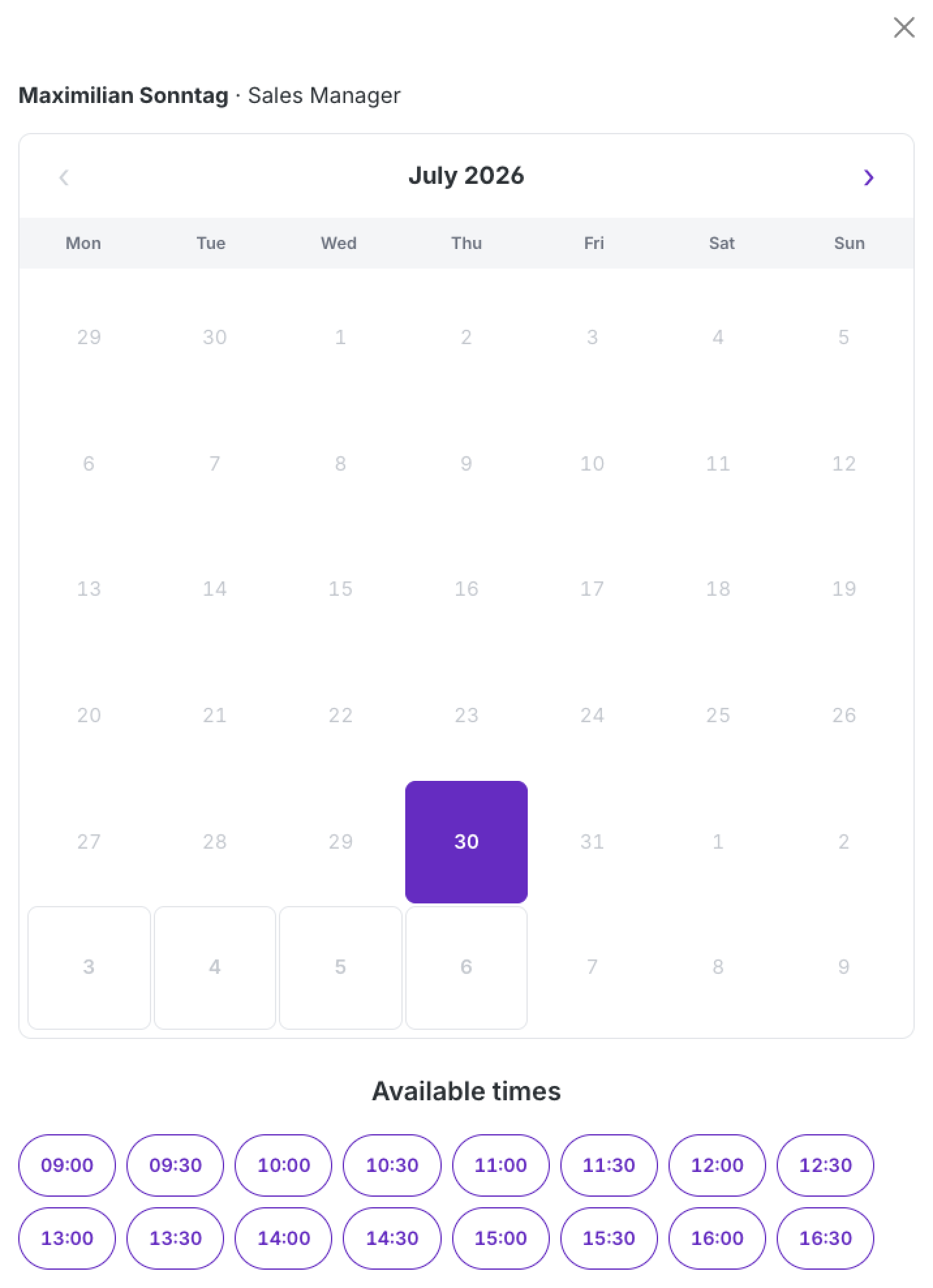
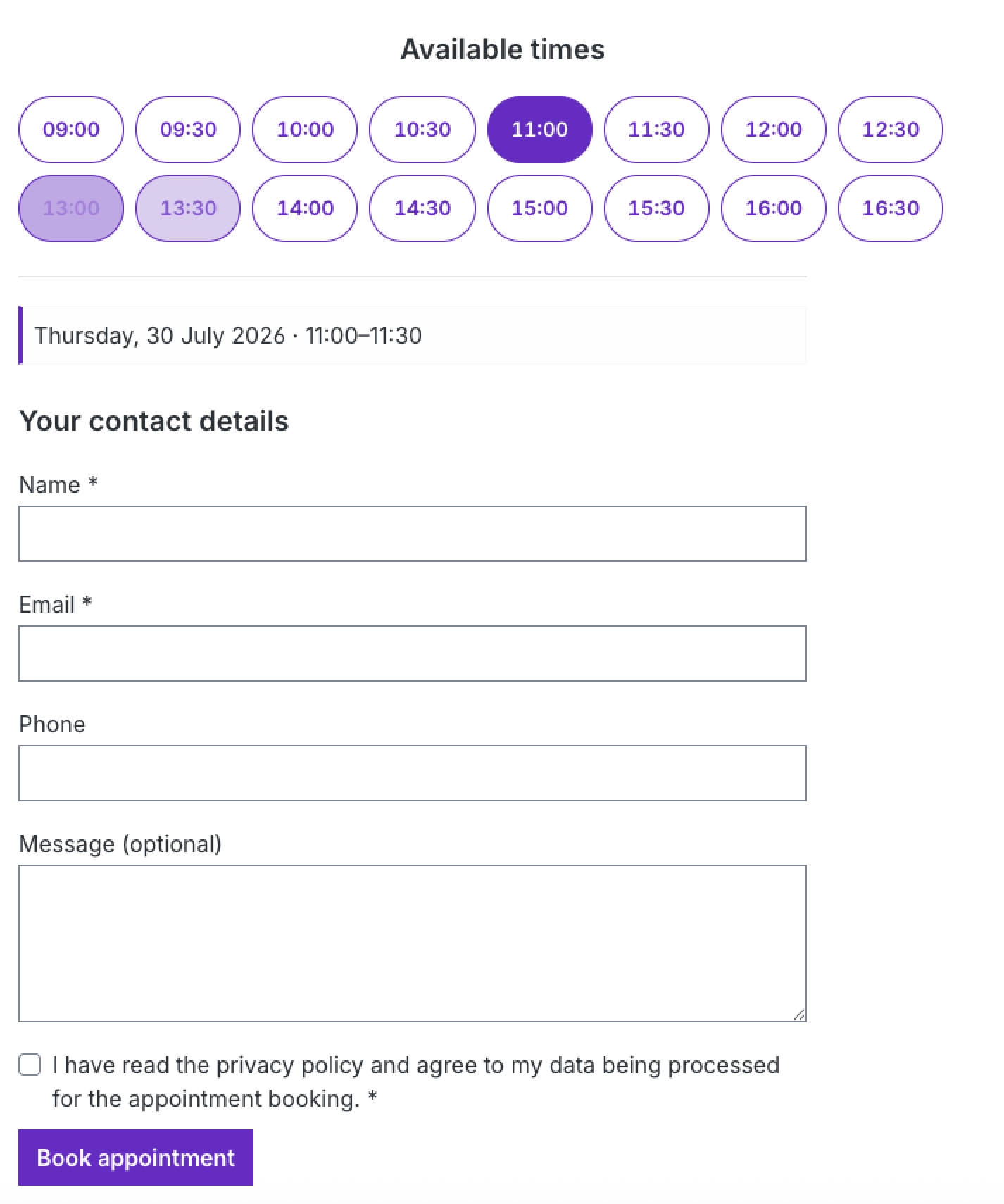
Customers reach the booking under the route /beratung. The flow consists of four steps:
- Choose a consultant (
/beratung) - Choose an appointment from the available slots (
/beratung/{beraterId}/termin) - Enter contact details and an optional message (
/beratung/{beraterId}/kontakt) - Receive confirmation (
/beratung/bestaetigung/{buchungId}) – including a calendar invite by email
A personal cancellation link (/beratung/stornieren/{token}) is generated per booking and sent along.
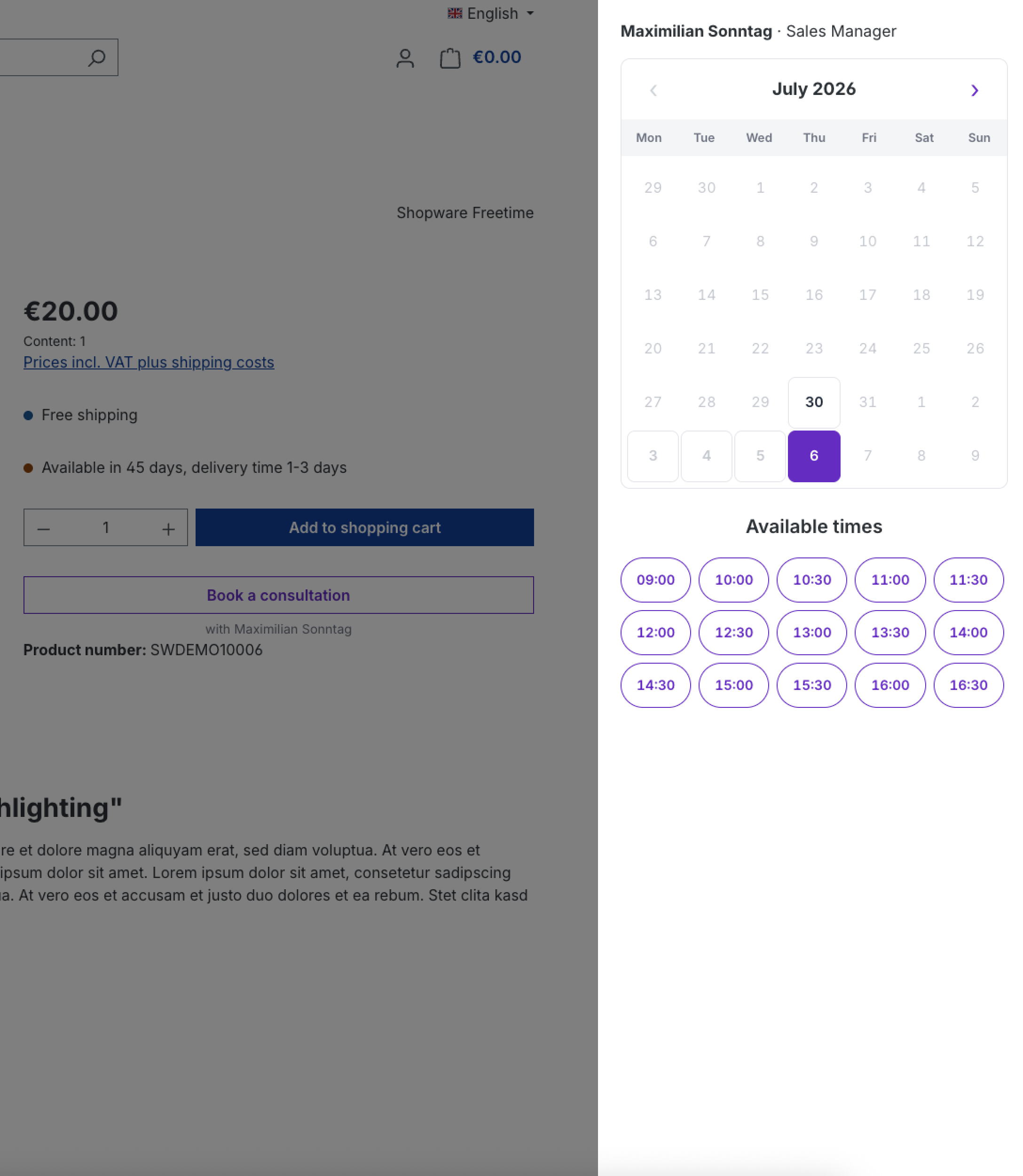
On the product page, the “Book a consultation” button opens the booking in an off-canvas – without leaving the page:
Freely placeable via Shopping Experiences
From the Starter plan onwards, a CMS block “Consultation booking” is available that you can freely place on Shopping Experiences pages.
📋 Managing bookings
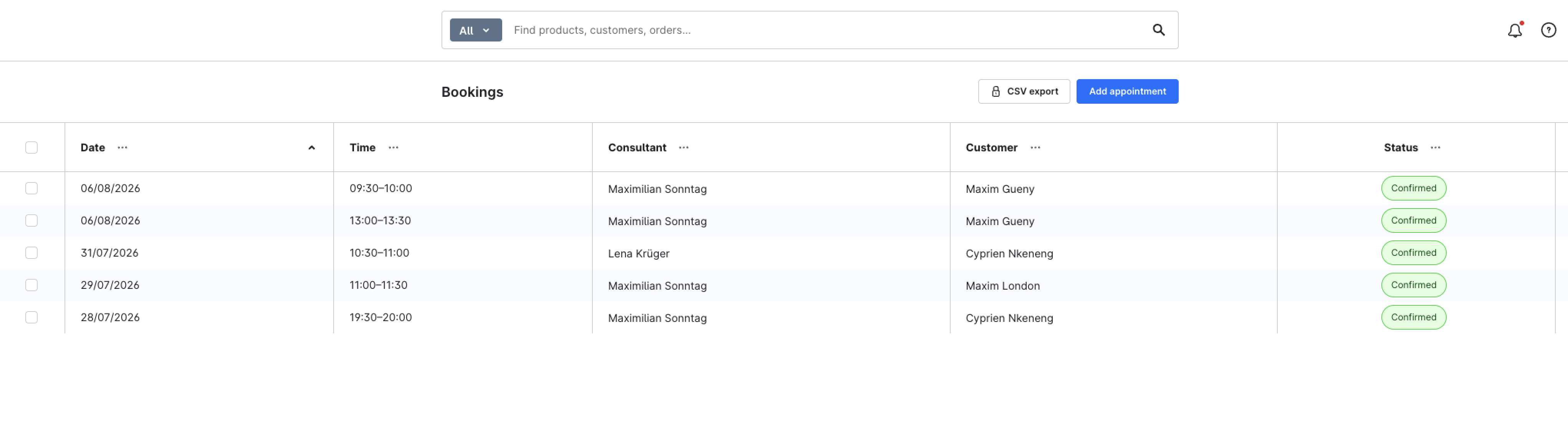
Under Customers > Consultation > Bookings you see all appointments with their status:
| Status | Meaning |
|---|---|
open | Open (when auto-confirm is disabled) |
confirmed | Confirmed |
cancelled | Cancelled |
completed | Completed |
From the Business plan onwards you can also enter appointments manually in the admin.
📤 CSV export (Pro)
From the Pro plan onwards, the booking overview shows a “CSV export” button. A single click downloads all bookings as a CSV file (consultation-bookings.csv) – ideal for teams with a high consultation volume who want to process the data outside Shopware (Excel, reporting, CRM).
The file is UTF-8 (with a BOM so Excel renders special characters correctly) and semicolon-separated. Columns included:
| Column | Content |
|---|---|
| Datum | Appointment date (YYYY-MM-DD) |
| Von / Bis | Start and end time |
| Berater | Assigned consultant |
| Kunde | Customer name |
| Customer email | |
| Telefon | Customer phone (if provided) |
| Status | Booking status |
| Nachricht | Optional customer message |
Without a Pro plan
The button stays visible (with a lock icon) and opens the In-App purchase dialog for the Pro plan directly.
📬 Email notifications
The plugin sends messages through the Shopware mail system to the customer and consultant:
| Type | Recipient | Attachment | From plan |
|---|---|---|---|
| Confirmation | Customer & consultant | .ics (Starter+) | Free (text) |
| Reminder | Customer | .ics | Starter |
| Cancellation | Customer & consultant | – | Business |
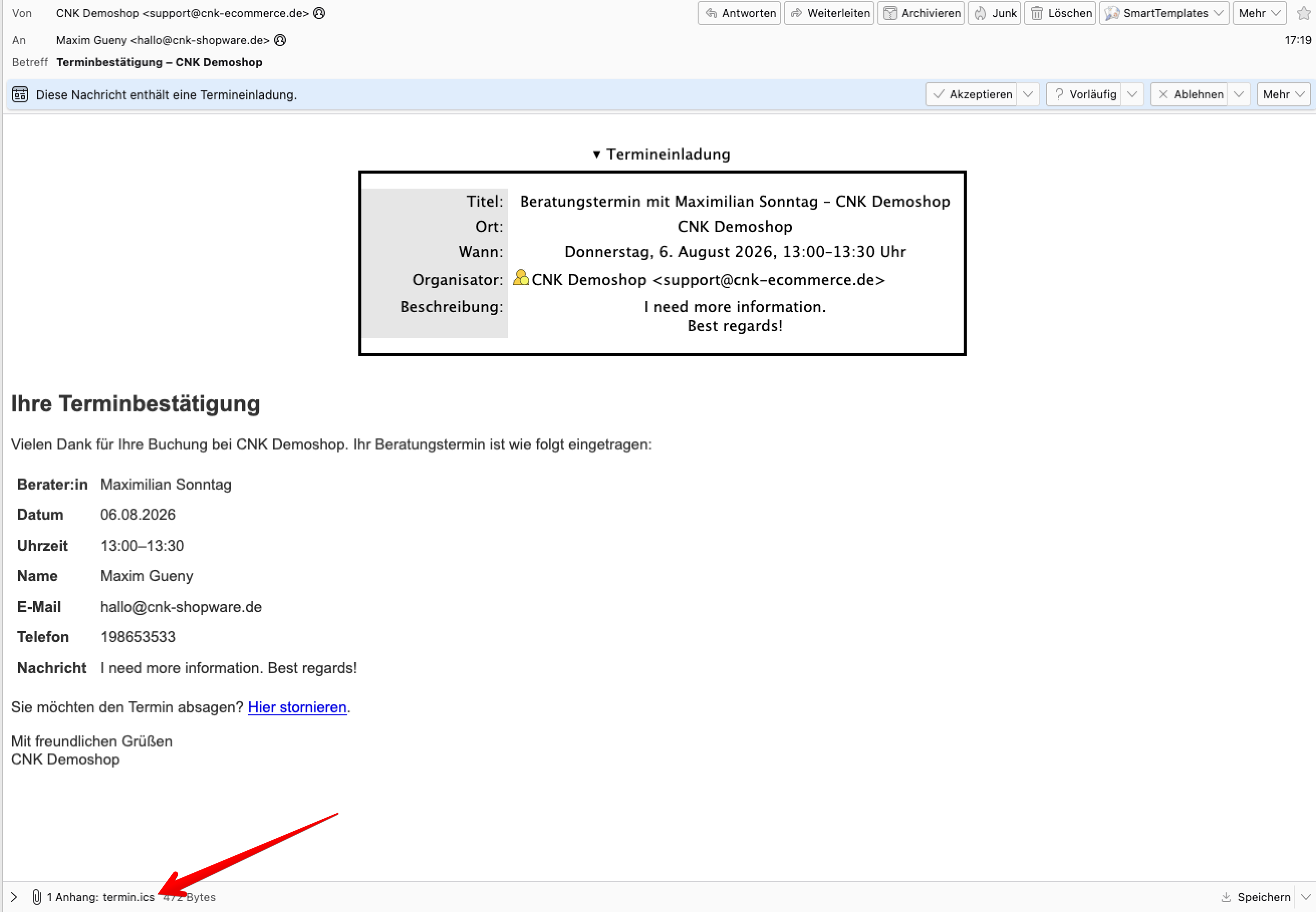
The reminder is sent through an hourly scheduled task (cnk_beratung.booking_reminder), controlled by reminderEnabled and reminderHoursBefore.
Freely editable email texts
All three emails are stored as Shopware email templates. Under Settings > Email templates you will find "Consultation appointment – confirmation / reminder / cancellation" and can adjust subject and content (de/en) at any time — no coding required.
Requirement: background worker
Sending reminders requires the Shopware background worker (message queue & scheduled tasks). It is active by default on Shopware Cloud and most managed hostings.
🔐 Permissions (ACL)
The module is fully integrated into the Shopware permission system. Under Users & permissions > Roles you will find the "Consultation booking" privilege group with Viewer / Editor / Creator / Deleter levels, letting you control which staff members may view or manage consultants and bookings.
🔒 Data protection (GDPR)
The plugin works entirely within your Shopware installation. There is no data transfer to external services – all consultant, appointment and customer data stays in your own Shopware database.
❓ FAQ
Is the plugin free?
Yes. The core is free forever – 4-step booking, 1 consultant, up to 5 bookings per month and a text confirmation email. Additional features are booked optionally via In-App Purchase.
Do I need Calendly or an external service?
No. The entire booking system runs inside your Shopware shop, with no external SaaS dependency.
Can customers book without a customer account?
Yes. Booking is possible without registration through a clear 4-step form.
Which Shopware version is required?
Shopware 6.7. The paid plans additionally require In-App Purchases.
How many consultants can I create?
Free 1 consultant, Starter 3 consultants, Business and Pro unlimited.
Do customers receive a calendar invite?
Yes, from the Starter plan onwards the confirmation and reminder email include an .ics attachment for customer and consultant.
📬 Support
For questions, suggestions for improvement or customizations, please contact us by email at support@cnk-plugins.de.